

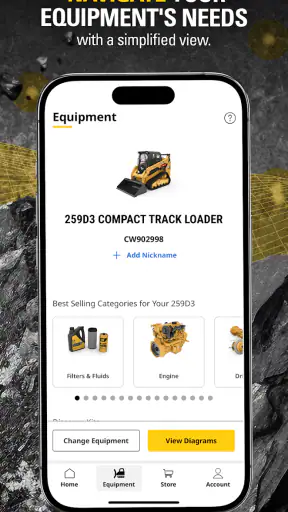
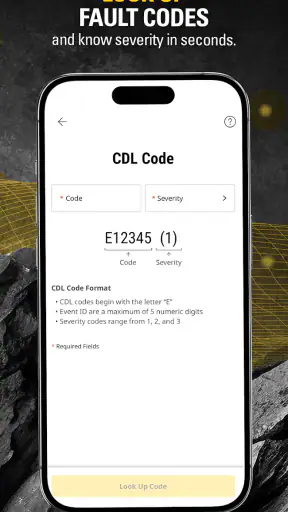
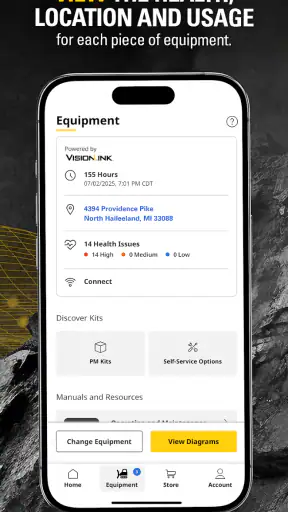
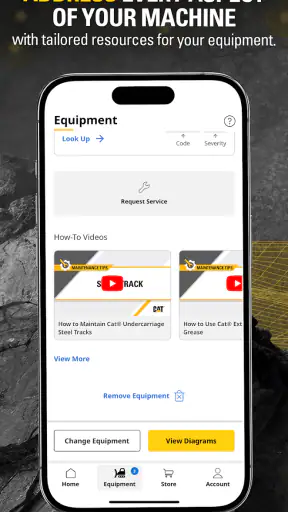
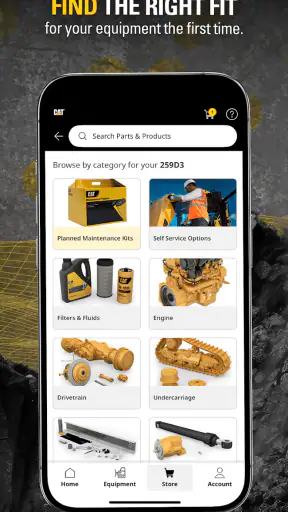
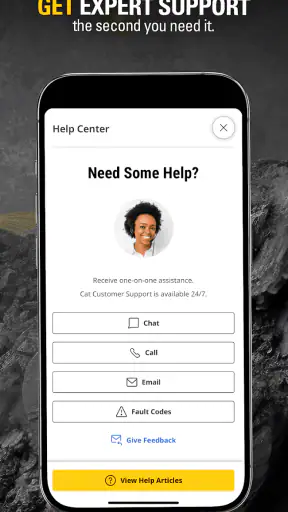
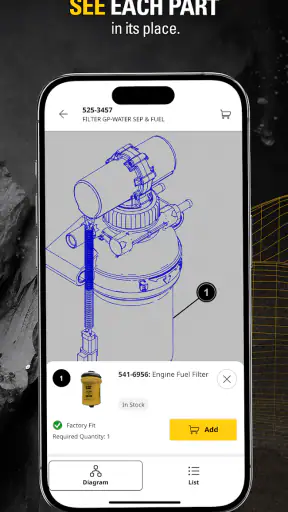
Cat® Central is the kind of business app that makes most sense when a machine, a phone, and a reliable connection need to work together. I used it with that practical mindset rather than treating it like a general productivity tool, and my impression is clear: it is aimed at people who own, operate, service, or manage Cat equipment, not casual users looking for a broad equipment marketplace or a generic maintenance notebook. Caterpillar Inc. has built it around the ownership experience, and that focus is its biggest strength.
The app is free, rated for Everyone, and sits in the Business category. It has reached over a million installs and holds a 4.5 average from around four and a half thousand ratings, which suggests that its audience is finding real value in having Cat-related information and tasks close at hand. I would still judge it by your daily workflow, because the usefulness depends heavily on whether you regularly deal with Cat equipment and whether you can stay connected when you need it.
What the app feels like in real equipment work
My first useful takeaway is that Cat® Central is not trying to replace every tool used by a construction company, farm, rental operation, or service team. Instead, it works best as a focused companion for the parts of ownership that are easy to postpone: checking equipment information, keeping track of maintenance-related needs, and getting closer to the resources associated with a Cat machine.
That distinction matters. A paper folder can hold manuals and service notes, while a spreadsheet can track hours and costs. A fleet-management platform may offer broader reporting across different brands. Cat Central occupies a different space. It puts the Cat relationship in a mobile setting, which is especially useful when the person holding the phone is standing beside the machine rather than sitting at a desk.
I found the focused approach more helpful than a crowded dashboard would have been. When an app is designed specifically around one manufacturer, the information can feel more relevant because the user is not sorting through unrelated brands or generic equipment categories. The trade-off is obvious: if your operation has a mixed fleet, Cat Central will not become the single system for everything. You may still need your existing fleet software, accounting package, service records, or workplace communication tools.
The current version is 4.8.0 and requires iOS or Android 11 or later. That is worth checking before asking a team to install it on older phones used in the field. Compatibility is not a glamorous detail, but a maintenance app that cannot run on the device assigned to a technician is an immediate workflow problem.
Where a connection changes the experience
Connectivity is central to how I would use this app. The moments that matter most are often the moments when information needs to be retrieved rather than merely read from a saved document. If I am beside a machine and need to review equipment-related details, the app is more useful when the phone can reach the service behind it. A weak signal can turn a quick check into a delay, especially on a busy site where walking back to an office is not realistic.
This makes Cat Central different from a static PDF library. A downloaded manual can be opened in places where a network is unavailable, while a connected app is better suited to information that may be tied to an account, equipment record, or current service workflow. I would not treat it as a guaranteed substitute for printed manuals or locally stored emergency instructions. For critical work, I would keep the established safety and service documentation available through the company’s normal process as well.
A realistic example is a small contractor preparing a machine for an early start. The owner receives a question from an operator, opens Cat Central while walking around the equipment, and uses the app as the first place to orient themselves. If the connection is stable, this can reduce the back-and-forth between the yard and the office. If the signal is poor, the smart response is not to keep tapping the same screen; it is to switch to the company’s backup records and return to the app when the connection is dependable.
My practical advice is to treat connectivity as part of the workflow, not as a background detail. Try the app in the actual places where your equipment operates: a yard, a basement, a rural property, or a large construction site. An app can feel excellent in an office and far less convenient beside a machine surrounded by concrete, metal, distance, or temporary network congestion.
Using it on a phone instead of at a desk
The mobile format is the reason Cat Central has a place in an equipment owner’s toolkit. A phone is already close to the operator, supervisor, or owner, and it avoids the small but repeated friction of finding a computer. That matters when a question appears during a walk-around inspection or when someone needs to confirm the next step without leaving the work area.
I also like the possibility of separating quick field actions from deeper office work. A supervisor can use the phone to identify what needs attention, then complete more detailed planning later through the company’s established process. That prevents the app from being forced into a role it may not be designed to fill. The best mobile tools do not need to replace the office; they need to remove unnecessary trips to it.
There is a trade-off with any phone-first workflow. A small screen is convenient for a quick check but less comfortable for comparing several records, writing long notes, or reviewing a complicated history. If your job requires extensive documentation, I would use Cat Central as an access point within the broader process rather than expecting it to be a full desktop maintenance system.
Field conditions also affect the experience. Gloves, dust, rain, glare, and a moving schedule are not software bugs, but they influence whether a mobile task is genuinely practical. I would avoid planning a long session beside the machine. Instead, use the app for short, purposeful interactions and complete any careful recordkeeping in a cleaner environment when possible.
What happens when something goes wrong
The most important failure scenario is not dramatic; it is ordinary. The app may take longer to load because the network is weak, an account-related step may need another attempt, or a user may open it at exactly the moment a site connection becomes unreliable. In those situations, recovery depends on having a sensible backup routine.
I would prepare a team before deployment rather than discovering this during a service interruption. Each operator or technician should know which information must remain available through the company’s normal offline materials, who can answer urgent questions, and where completed maintenance records belong if the app cannot be reached. Cat Central can support the connected portion of the process, but it should not be the only place the organization knows how to look.
When the app does not respond as expected, my troubleshooting order would be simple: check the phone’s connection, move to a location with better reception, restart the app, and confirm that the device meets the operating-system requirement. If the issue affects several users, the problem is less likely to be the individual phone and more likely to involve the service or the organization’s access setup. Keeping that distinction in mind prevents a technician from wasting time repeatedly changing settings that are not responsible.
Another useful habit is to avoid beginning a time-sensitive task at the last possible moment. If a machine is due to leave the yard, open the relevant information while the phone still has a strong connection. That small change turns a network problem from an emergency into a manageable inconvenience. It is one of the less obvious benefits of treating a connected app as preparation rather than rescue.
Keeping mobile use sensible with data
I would not assume that every action has the same data cost. Text-based information is generally easier on a mobile connection than rich media or repeated refreshes, but the exact behavior can vary by screen and service. For that reason, I would use Wi-Fi for any substantial setup, updates, or extended browsing whenever it is convenient, then reserve mobile data for the field checks that actually need to happen away from the office.
Teams should also avoid having several people repeatedly reload the same information simply because they have not agreed on who is responsible for checking it. A shared routine is more efficient: one supervisor confirms the relevant equipment information, communicates the result, and records the action through the organization’s chosen process. This reduces duplicated requests and makes it easier to tell whether a problem is with the app or with unclear responsibility.
Battery planning belongs in the same conversation. A phone searching for a weak signal can become less dependable over a long day, and field workers may already be using the camera, navigation, calls, or other work tools. I would begin the day with a charged device, carry the company-approved power option, and avoid unnecessary browsing when the information is not needed immediately. That is not specific to one app, but it is particularly relevant when the app’s value depends on reaching connected services at the right moment.
Privacy and account discipline are also practical concerns for a business tool. I would use individual company-approved access rather than passing one login between operators, and I would lock the phone when it is set down. Shared credentials make it harder to understand who performed an action and create avoidable confusion when a team changes. Cat Central may be free to install, but the surrounding workflow still deserves the same care as any business system.
Who will get the most from Cat Central?
I would recommend it first to Cat equipment owners, independent operators, small contractors, fleet supervisors, and service-minded managers who want a manufacturer-specific mobile reference point. It is particularly appealing when the same person alternates between office planning and field work, because the phone can bridge those two environments without requiring a separate general-purpose system for every small question.
It also makes sense for a business that is already committed to Cat equipment and wants its staff to use a consistent Cat-focused resource. The app’s value increases when the team agrees on when to use it, what information should be checked there, and which records must still be maintained elsewhere. Without that agreement, people may install it but continue relying on scattered messages, paper notes, and old files.
I would be more cautious if you operate a mostly non-Cat fleet, need advanced cross-brand analytics, or want a complete work-order and cost-accounting platform in one place. In those cases, a dedicated fleet-management product or an established maintenance-management system may be the better primary tool. Cat Central can still have a supporting role for Cat machines, but it should not be purchased emotionally just because it carries the manufacturer’s name.
How it compares with familiar alternatives
The usual alternatives each win in a different situation. A paper manual is dependable as a local reference and does not care about reception, but it can become outdated, bulky, or difficult to search. A folder of PDFs is more portable, yet it may lack the focused connection between a machine owner and the manufacturer’s digital resources. A spreadsheet is flexible for hours, costs, and internal notes, but it requires someone to design and maintain the structure.
Generic maintenance apps can be stronger when you need custom fields, mixed-brand equipment, team assignments, or detailed reporting across an entire operation. Their weakness is that they may not feel as naturally aligned with Cat-specific ownership tasks. Cat Central is the more sensible choice when manufacturer context matters more than broad customization.
The best arrangement may be a combination rather than a winner-takes-all decision. I would use Cat Central for Cat-focused access and mobile ownership tasks, a company system for formal work orders and financial records, and a local backup for information that must remain available during a network failure. That division keeps each tool in the role where it is most useful instead of making one app carry the whole operation.
Small habits that make the app more useful
Before handing the app to a crew, I would install it on the actual devices they use and test the complete sign-in and information-retrieval routine at the yard. Do not test only on office Wi-Fi. A field trial reveals whether the phone, signal, screen visibility, and user permissions work together under real conditions.
I would also create a short internal rule for connected tasks: check important information before leaving a reliable network, do not rely on the app as the only emergency reference, and record follow-up work in the company’s official system. This three-part habit addresses the most common weakness of mobile services without undermining their convenience.
Finally, I would review the app after the team has used it for a normal work cycle. Ask which actions saved a trip to the office, which screens caused hesitation, and where users still needed paper or another system. That review tells you whether Cat Central is genuinely improving the workflow or merely adding another icon to the phone.
My connectivity verdict
After looking at it as a working tool rather than a simple download, I see Cat Central as a useful, specialized companion for people who live in the Cat equipment ecosystem. Its strongest quality is focus: it brings the manufacturer relationship into the mobile moments when an owner or operator is actually near the machine. The free price and Everyone rating make it easy to try, while the large install base indicates that it is not a niche experiment.
Its limitations are equally important. A dependable network can shape the experience, a phone is not ideal for every documentation task, and mixed-brand operations may need a broader platform. I would not replace formal maintenance records, safety procedures, or backup references with it. Instead, I would place it in a connected layer of the workflow and give it a clear job.
Cat® Central is worth installing if you want Cat-specific support within reach during everyday equipment work. I would recommend it to a Cat-focused owner or supervisor who is willing to plan for weak connectivity and keep a second line of recordkeeping. If your priority is deep fleet analytics, extensive customization, or one system for many manufacturers, choose a broader business tool first. For the right user, though, this app can turn a scattered ownership routine into a more immediate and manageable mobile experience.
Caterpillar Inc. released the app on December 9, 2022, and its continued presence in the business category gives it a practical place in a modern equipment workflow. I would start with a real site test, not a theoretical comparison. If it helps your team answer questions faster and prepare work before a connection becomes unreliable, it has earned its place on the phone.


